

September 16, 2026
Watch Store.
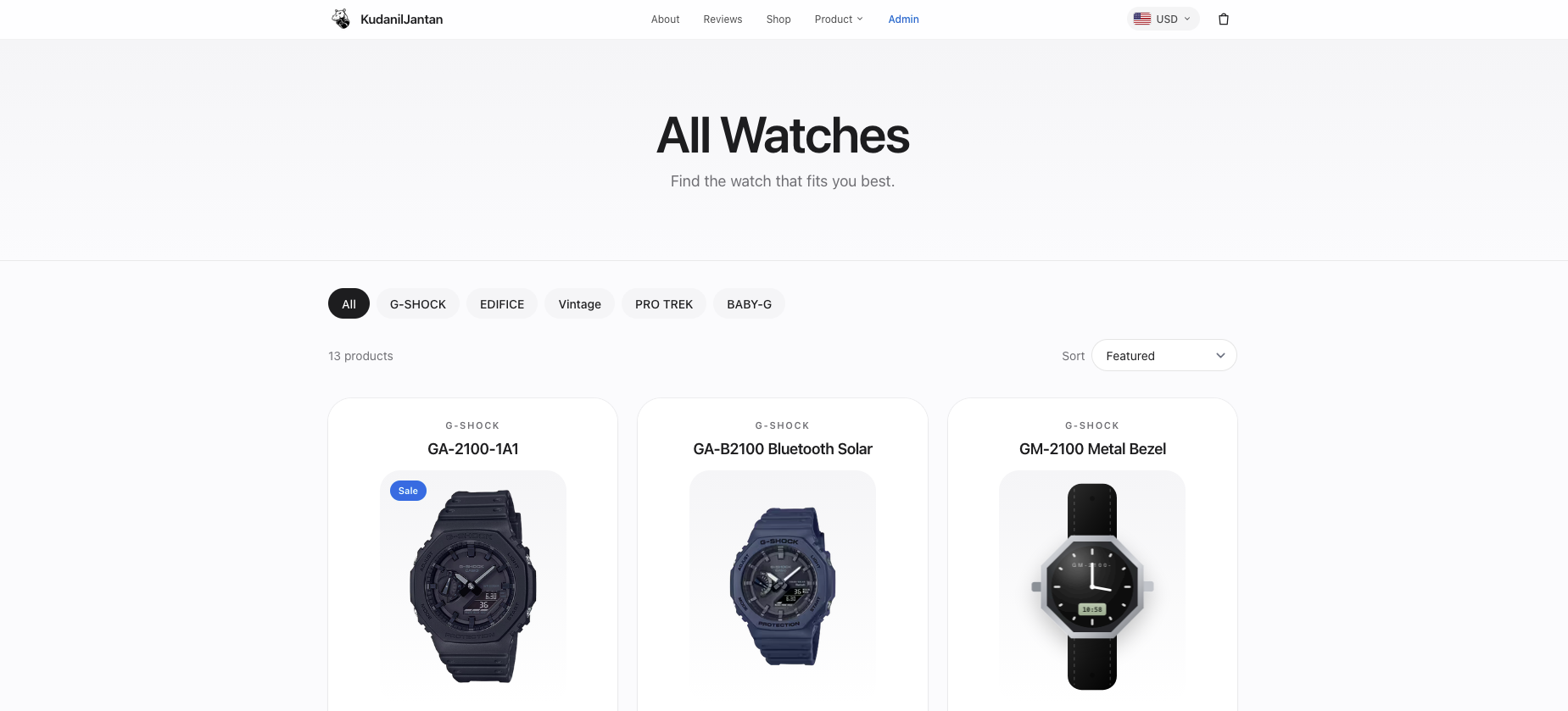
Frontend · BackendA modern Casio watch e-commerce store inspired by the Apple Watch website, built with Laravel 13, Inertia, React, Tailwind CSS, and Framer Motion, with a custom Blade admin panel and Midtrans payment integration.
Description
Watch Store is a modern e-commerce experience for Casio watches, designed with a visual style inspired by Apple Watch. The storefront combines generous whitespace, clean typography, smooth animations, and product-focused layouts to create a polished shopping experience.
Beyond the storefront, the project includes a custom Blade-based admin panel for managing products, categories, orders, and inventory, as well as an integrated Midtrans payment flow with a demo mode for local development.
Background
This is an entry in my “One Day One Code” series of focused builds. I wanted to go beyond a static landing page and use the project as an opportunity to build a complete e-commerce flow, from browsing products and managing a cart to checkout, payment, order status, and administration.
The visual direction takes inspiration from the Apple Watch website: large product visuals, minimal layouts, generous spacing, and subtle motion are used to keep the watches at the center of the experience.
Goal
Build a complete watch-store experience that feels like a modern product website while implementing the essential functionality of a real e-commerce application.
The project covers both sides of the system: a polished React storefront for customers and a custom Laravel Blade admin panel for managing the underlying catalog, inventory, and orders.
Features
Apple Watch-inspired landing page with clean, product-focused sections and smooth reveal animations.
Product catalog with categories including G-Shock, Edifice, Vintage, Pro Trek, and Baby-G.
Product detail pages with watch information, imagery, pricing, and purchasing actions.
Shopping cart stored in
localStorage, allowing cart contents to persist between page visits.Server-side price recalculation during checkout to prevent relying on client-side prices.
Order creation with automatic stock reduction.
Checkout and order-payment flow.
Midtrans Snap integration for payment processing, with a demo mode available when payment credentials are not configured.
Midtrans webhook handling for updating payment status.
Order status pages for tracking the state of a purchase.
Custom admin panel built with Laravel Blade and Tailwind CSS.
Admin functionality for managing categories, products, inventory, and orders.
Automatic SVG watch illustrations for products without uploaded photos, with customizable dial and strap colors.
Responsive storefront designed for desktop and mobile screens.
Technologies
Laravel 13 for the backend, routing, controllers, models, database interaction, authentication, and order processing.
React 18 with Inertia.js for the storefront interface without requiring a separate frontend application.
Tailwind CSS for responsive layouts and UI styling.
Framer Motion for smooth page transitions, reveal animations, and micro-interactions.
Blade and Tailwind CSS for the custom admin panel.
SQLite as the default development database.
Midtrans Snap for the optional payment integration.
localStoragefor client-side shopping-cart persistence.
How to Run
Clone the repository and install the PHP and JavaScript dependencies:
composer install
npm install
Run the Laravel server, Vite development server, and queue together with:
composer dev
Then open http://localhost:8000.
Alternatively, run the services manually in separate terminals:
php artisan serve
npm run dev
For a production frontend build:
npm run build
To reset the database and populate the example catalog:
php artisan migrate:fresh --seed
The seeder creates five watch categories and thirteen example Casio products.
Admin Access
The custom admin panel is available at /admin.
The seeded development account is:
- Email:
[email protected] - Password:
password
The public storefront is available through:
/— Landing page/shop— Product catalog/watch/{slug}— Product detail/checkout— Checkout
Technical Decisions
The storefront uses Laravel with Inertia and React so that the application can retain Laravel’s backend and routing architecture while providing a modern client-side interface. This avoids splitting the project into separate backend and frontend applications while still allowing the storefront to behave like a contemporary web app.
The shopping cart is intentionally stored in localStorage to keep the client-side experience lightweight. However, important checkout data is never trusted from the browser. Product prices are recalculated from the database on the server before creating an order, and inventory is updated as part of the checkout process.
For administration, the project uses a separate Blade and Tailwind implementation rather than React. This keeps the admin interface closely integrated with Laravel while allowing the customer-facing storefront to remain focused on its richer interactive experience.
Products without uploaded photography fall back to generated SVG watch illustrations. This provides every seeded product with a visual representation without requiring a complete set of image assets.
Midtrans is implemented as an optional payment layer. When credentials are unavailable, checkout can still be demonstrated through a local demo-payment mode, while a configured Midtrans environment can handle actual sandbox payment methods and webhook notifications.
What I Learned
Building Watch Store gave me experience taking an e-commerce project beyond the visual storefront and into the underlying purchase workflow. I worked with product and category relationships, cart persistence, server-side price validation, inventory changes, order creation, payment states, and webhook-based updates.
The project also helped me understand how Laravel, Inertia, and React can work together without turning the application into a completely separate frontend and backend stack.
On the frontend side, recreating the visual language of modern product websites taught me how whitespace, typography, product imagery, and motion can work together without overwhelming the interface. Framer Motion was particularly useful for adding movement while keeping the overall design restrained.
Notes
This project is an educational/demo implementation and is not an official Casio store.
The included Midtrans configuration is intended for sandbox use. Without payment credentials, the application falls back to a demo payment flow so the complete ordering experience can still be tested locally.
Part of the shared one-day-one-code repository.

Hey! I’m Fanny, the software engineer tending to this digital garden. You can read more about me, or subscribe by email.